
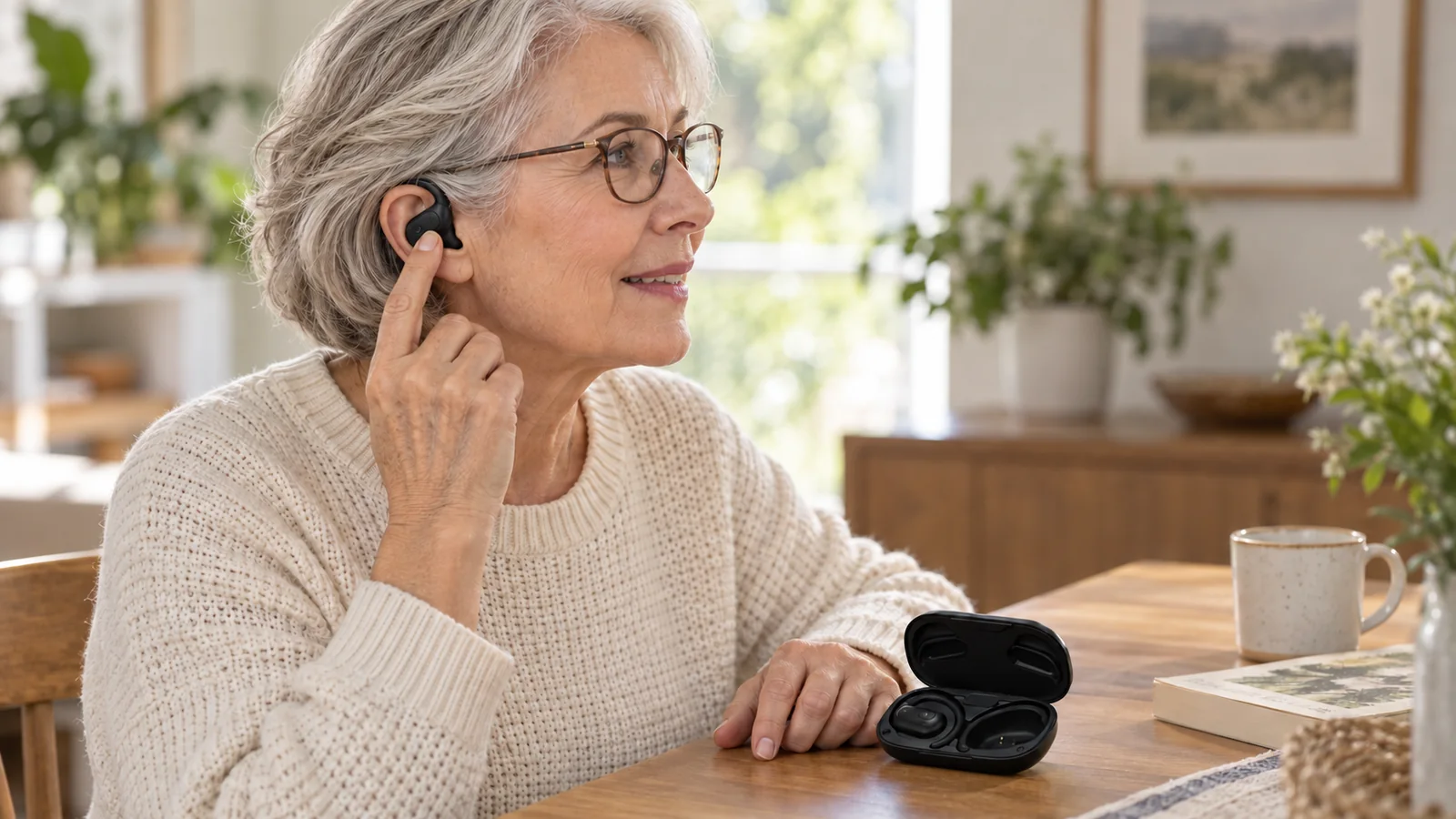
Everyday usability: wearing position, glasses contact and control reach. AI-generated scenario.
Open-ear headphones for older adults should be evaluated through everyday tasks: putting them on, changing the volume and charging them correctly. A useful review records what the person can do independently, where they hesitate and whether comfort changes during use. An open ear canal alone does not establish that a product is easy to use or suitable for a particular listener.
For health audio brands, this makes usability a product requirement that can be observed before a design is approved. For retailers and families, the same tasks offer a practical way to assess a demonstration unit.
In this guide
Start with the person and the situation
Imagine someone who wears glasses, makes calls on a phone and prefers physical controls. Their priorities may differ from those of someone who wants a lightweight headset for walking and already uses touch gestures comfortably. Age alone does not describe either person well enough to choose a design.
Before a demonstration, establish the intended activities, usual phone, glasses or other equipment, and preferred way of controlling sound. Ask about previous headphones: what was comfortable, what required help and what caused the person to stop using them? Keep individual answers separate from claims about all older users.
A brand can turn these answers into a short product brief. “Easy to use” becomes a set of tasks to evaluate. “Comfortable” becomes a question about contact points, movement and the intended wearing period.
Task 1: Put the headphones on without coaching
Hand over the device and its normal instructions. Ask the participant to put it on as they would at home. Avoid demonstrating the correct movement first; that would hide whether the product communicates its own orientation.
Record whether the person can identify the left and right sides, find the intended position and adjust the device. If they wear glasses, keep those glasses on. Observe contact between the frames and the headphones instead of assuming that every ear-hook design will interfere, or that every clip-on design will avoid interference.
After fitting, introduce the movements relevant to the intended use: looking down at a phone, turning the head or walking in a suitable setting. Ask where the device is felt and whether the person wants to reposition it. Continue the review for the intended activity; a brief first impression cannot establish comfort over a longer period.
For the product team: separate a retention problem from a pressure problem. A device that stays in place because it presses harder has not automatically reached a better design. Record both stability and the participant’s description of comfort before choosing a change.
Task 2: Change the volume and confirm what happened
Ask the participant to change the volume to a comfortable level. Start from a low setting and avoid asking them to increase it for the purpose of completing a test.
Watch for three things: finding the control, operating it and understanding the response. Can the person distinguish volume from power or mode selection? Does adjusting the headset trigger an unintended command? If a long press has a different function from a short press, can the person use both without repeated explanation?
A button’s tactile response, a spoken prompt and an indicator each communicate something different. Check the actual combination. Do not assume that a light is sufficient feedback when the wearer cannot see it, or that a sound prompt will be understood in every listening condition.
Repeat the task after another activity, using the same instructions. This helps distinguish a control that is immediately understandable from one that works only while the demonstration is fresh in memory.
For the product team: specify the action and expected feedback together. “Volume button included” is less useful than “the wearer can identify the volume control, change the level and confirm the change without opening the phone.”
Task 3: Charge the device and identify its state
Ask the participant to prepare the headphones for their next use. For a case-based design, observe how they orient and place the earpieces. For a cable-charged design, observe connector identification and insertion.
Then ask a simple question: “How do you know it is charging?” The answer should come from the product’s actual feedback and instructions. Check whether the person can distinguish charging from fully charged, and whether they can identify an unsuccessful connection.
For a charging case, separate the case battery from the earpiece batteries. A light on the case may not answer the user’s question about an individual earpiece. For either design, check the required cable, power source and instructions as a complete experience.
For the product team: record the observed placement, indicator and interpretation. This usability review complements electrical and battery testing; it does not replace those tests.
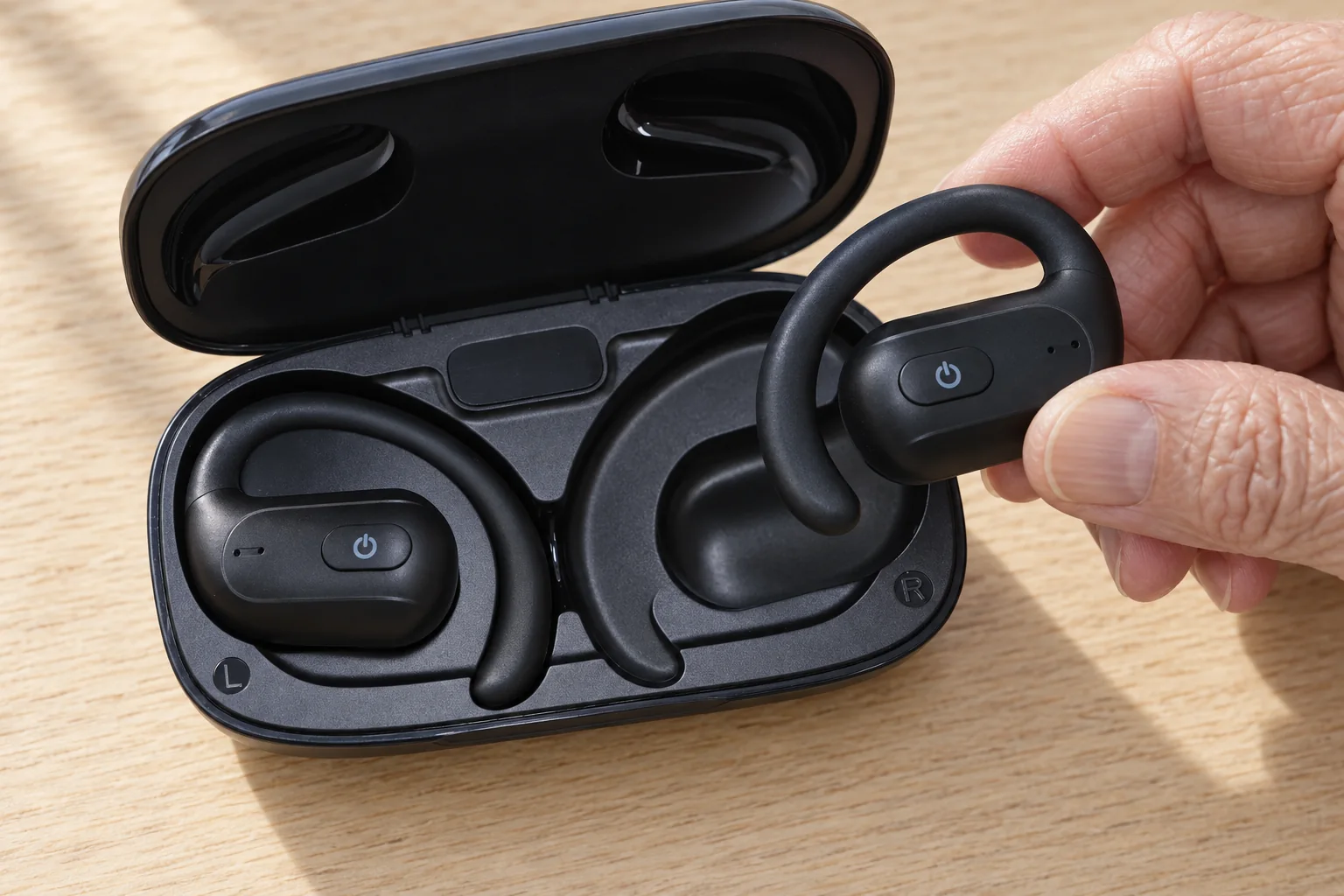
Can the user identify the matching earpiece and recess?
Observe orientation, grip and seating; record whether help is needed.
Verify charging feedback on the powered sample. Placement alone is not proof of charging.
A checklist for a useful product review
Use one record for each participant and device version. Obtain permission before collecting photographs or recordings, and include only the personal information needed for the review.
| Task | What to observe | What to record |
|---|---|---|
| Put on | Orientation, adjustments, glasses contact and movement | Help required, contact points, repositioning and duration |
| Change volume | Control identification, accidental commands and feedback | Independent success, prompts needed and interpretation |
| Charge | Placement or connection, visible state and error recognition | Successful connection, state understood and help required |
| Repeat later | Whether the tasks remain understandable | What changed after a break or a new session |
For each task, record completed independently, completed with help, or not completed, followed by a short factual observation. These categories organize a review; they are not a universal pass score. Agree on acceptance criteria for the intended users and use case before comparing samples.
If a component, control layout or software behavior changes, repeat the affected tasks. A result from one version should not quietly become evidence for a different version.
Keep comfort, usability and hearing health separate
A product can be comfortable yet difficult to operate. It can be easy to operate yet unsuitable for the person’s hearing needs. Keeping these questions separate produces clearer product decisions and clearer marketing.
The World Health Organization explains that hearing risk depends on sound level, listening duration and repeated exposure. An open-ear shape is therefore insufficient evidence for a general promise that headphones prevent hearing damage. If someone has persistent ringing or difficulty following conversations, a hearing professional can assess their needs. WHO: Safe listening
This checklist evaluates interaction with headphones. It does not establish hearing improvement or determine whether a hearing aid is appropriate.
What should a brand ask its development partner?
Bring the observations to the engineering discussion. Ask which design change addresses each problem, which other aspects it may affect and how the revised sample will be evaluated.
A useful product brief can be short: intended users, main activity, usual phone, preferred controls, wearing requirements and the three tasks above. This gives the discussion a concrete starting point. ALOVA’s open-ear ODM service connects product definition with design and production development; the requirements for a particular project should be agreed around its intended use.
Developing open-ear headphones for older users? Tell ALOVA who will use the product and which tasks matter most. Use the checklist above to describe the experience you want the product to deliver.